
Warehouse Management mobile app accessibility features added/updated in Supply Chain Management 10.0.36 (October 2023)
What changed#
Microsoft added or updated documentation/article coverage for “Warehouse Management mobile app accessibility features.”
Source statement framing: The evidence describes this as a new/updated article under the Warehouse management feature area: “Warehouse Management mobile app accessibility features.” No explicit product behavior change (for example, new accessibility functionality in the app) is stated; the change is presented at the documentation/“what’s new or changed” level.
Affected products and modules#
- Dynamics 365 Supply Chain Management
- Module/feature area: Warehouse management
- Component referenced: Warehouse Management mobile app (accessibility features)
Not specified by Microsoft: whether the accessibility features apply to any other D365 apps beyond the Warehouse Management mobile app.
Availability and dates#
- The “What’s new or changed” page title references Dynamics 365 Supply Chain Management 10.0.36 (October 2023).
- Evidence includes page metadata:
- Published: 2025-08-05
- Modified: 2025-08-05
Not specified by Microsoft: when the accessibility feature itself became available in tenant/runtime terms (the evidence ties it to the 10.0.36 release family via the page title, but does not provide a rollout schedule or enablement date).
Prerequisites and enablement#
The evidence does not describe any feature-flag, licensing, or admin enablement specifically for accessibility features.
However, the accessibility article content indicates:
- Workers can configure accessibility settings locally on the device through its Settings.
- Administrators can set defaults remotely “as described in Mobile device user settings.”
Not specified by Microsoft: the exact configuration steps/fields for remote defaults (the evidence points to a separate topic, but details are not included in the provided excerpt).
Limitations#
From the accessibility article (as provided), the following limitations/constraints are stated:
- Settings are configured on the device (workers) via device Settings; administrators can set defaults, but the mechanism details are not included in the evidence.
- Accessibility settings listed are application/UI oriented (font/button scaling, color themes, button positions, screen reader support).
Not specified by Microsoft: any limitations by OS version, device model, or app version.
Migration or adoption guidance#
No migration steps are provided in the evidence.
Practical adoption guidance that can be directly grounded in the evidence:
- Workers can adjust font scaling (range 50%–400%) and button scaling (range 50%–200%) to match visual needs.
- Workers can choose color themes including Auto, Light, Dark, High-contrast white, and High-contrast black.
- Workers can change button positions (top-left/top-right or bottom-left/bottom-right (default)).
- Screen readers supported are listed per platform:
- Android: TalkBack (preinstalled)
- Windows: Narrator (built-in)
- iOS: VoiceOver (built-in)
Not specified by Microsoft: whether these features require specific platform settings or how to validate screen reader support in a production warehouse environment.
XppForge analysis#
Interpretation (grounded in evidence): This “meaningful change” is that Microsoft’s “What’s new or changed” highlights a new/updated accessibility-focused article for the Warehouse Management mobile app tied to Supply Chain Management 10.0.36 (October 2023).
Who needs to act:
- Warehouse operations/IT/admins responsible for Warehouse Management mobile app rollout or user enablement for accessibility needs.
Implementation decision / operational risk changes (what to verify):
- Decide whether your worker training and device configurations should include the new accessibility options and supported screen readers.
- Verify that mobile devices used by warehouse workers support the cited accessibility technologies (TalkBack / Narrator / VoiceOver) and that worker device Settings align with desired font/button/theme preferences.
What should be verified (evidence-based):
- Worker ability to configure font scaling, button scaling, color themes, button positions, and screen reader usage as listed.
- If you use centralized defaults, verify how Mobile device user settings can set remote defaults for these accessibility features (details not provided in the evidence).
What remains uncertain (missing detail):
- Whether there is any underlying new runtime accessibility capability in the app versus documentation updates only.
- Any tenant-level rollout timing, enablement flags, or version-specific behavior beyond the page association with 10.0.36.
- Any device/OS version constraints for the accessibility features.
Actionable recommendation (directly derived):
- Review the supported accessibility configuration ranges and screen readers in the provided accessibility article, then confirm your warehouse mobile device readiness and user guidance accordingly.
Microsoft sources#
- Whats new scm 10 0 36
- Warehouse app accessibility
- Install configure warehouse management app
- Mobile device user settings
- Step icons titles
- Warehouse app authenticate qr code
- Warehouse app authenticate user based
- Warehouse app conditional access enable
- Warehouse app connection settings
- Warehouse app control updates
- Warehouse app custom app registration
- Warehouse app hardware integration
- Warehouse app intune user based
- Warehouse app qr code
- Warehouse app user based auth faq
- Reason codes for counting journals
- Warehouse transactions
- Feature management overview
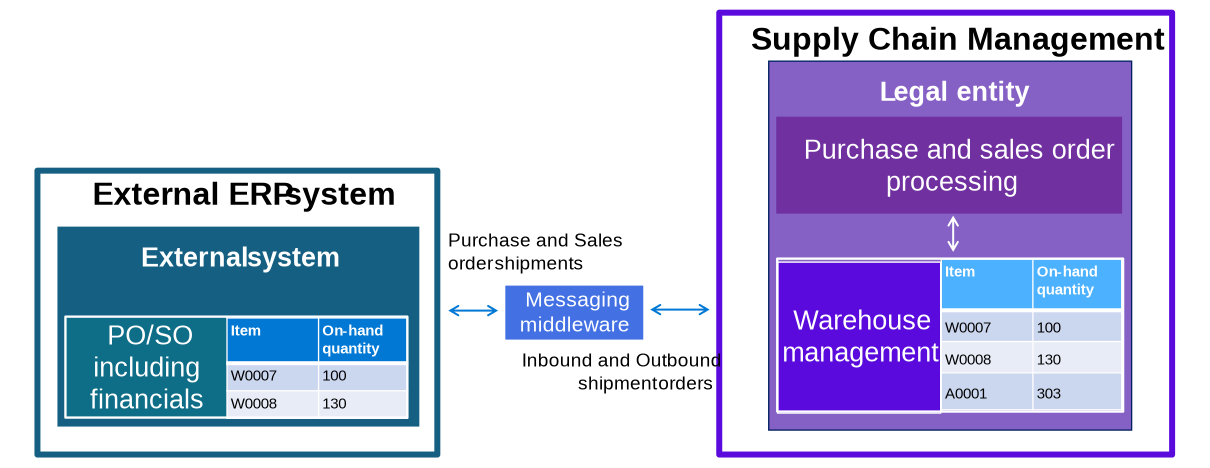
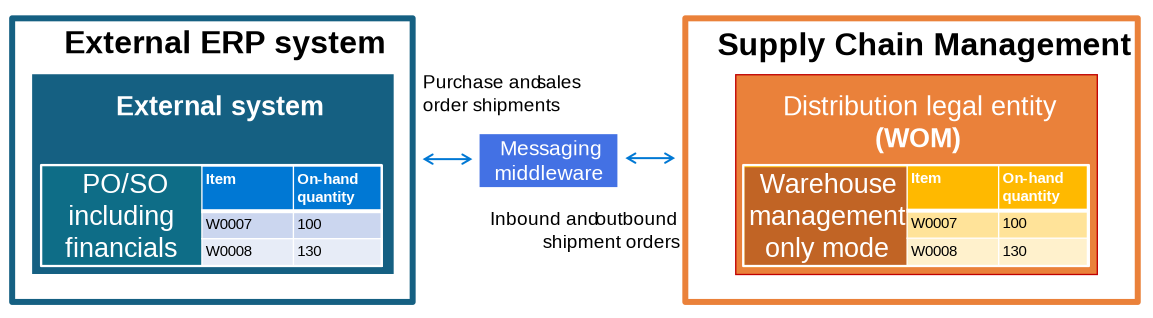
- Wms only mode overview
- Quality management processes
- In transit processing
- Cross docking opportunities
- Sales returns
- Catch weight processing
- Filters and filter codes
- Flexible warehouse level dimension reservation
- Wms only d365 shared warehouse integration.svg
- Wms only d365 wms and erp integration.svg
- Wms only erp integration.svg
- Wms only high level integrations.svg
- Sales returns unannounced
- Warehouse management overview
- Wms only mode example
- Wms only mode external erp
- Wms only mode external shared warehouse
- Finance operations apps overview
- Warehouse app detours
- Demo data
- Configure mobile devices warehouse
- Mobile app titles instructions
- Mobile device work users
- Packing work
- Confirm and transfer
- Packing containers
- Warehouse app packing containers
- Gs1 barcodes
- Work user sessions
- Warehousing mobile device app license plate receiving
- Inbound load handling
- Mixed license plate receiving
- Warehouse work policies
- Print container labels
- Warehouse app data inquiry
- Warehouse app pack containers policies
- Warehouse app pack containers scenario
- Create location directive
- Channels setup warehouse
- Inventory home page
- Control warehouse location directives
- Location directive acceptance tests
- Configure locations wms enabled warehouse
- Warehouse groups
- Quality management for warehouses processes
- Product receipt against purchase orders
- Purchase order approval confirmation
- Transportation management overview
- Create or modify an inbound load
- Get started with setting up module
- Load receive complete
- Inbound process.svg
- Pick line grouping
- Warehouse work policies.png
- Location directives optimize
- Batch processing overview
- Optimization advisor overview
- Dynamic printing selection
- Label printing using external label service
- Document routing layout for license plates
- Print license plate labels using label layouts
- Warehouse app user settings themes



Change history#
- 2026-09-30 — First published from Microsoft information
0 answers
Write an answerKnow the solution?
Sign in to contribute an answer and build your community reputation.
Sign in to answer